New · TRGR8 1.0.0 for Roland TR-8

TRGR8 1.0.0

It’s a sampler now! 14-input class-compliant USB audio, SP-1200–style fader editing, parameter locks, and 50 effect variations for the Roland TR-8.

Lifetime Free Updates $45 USD one-time purchase via Stripe Full TRGR8 1.0.0 release bundle emailed when payment is received

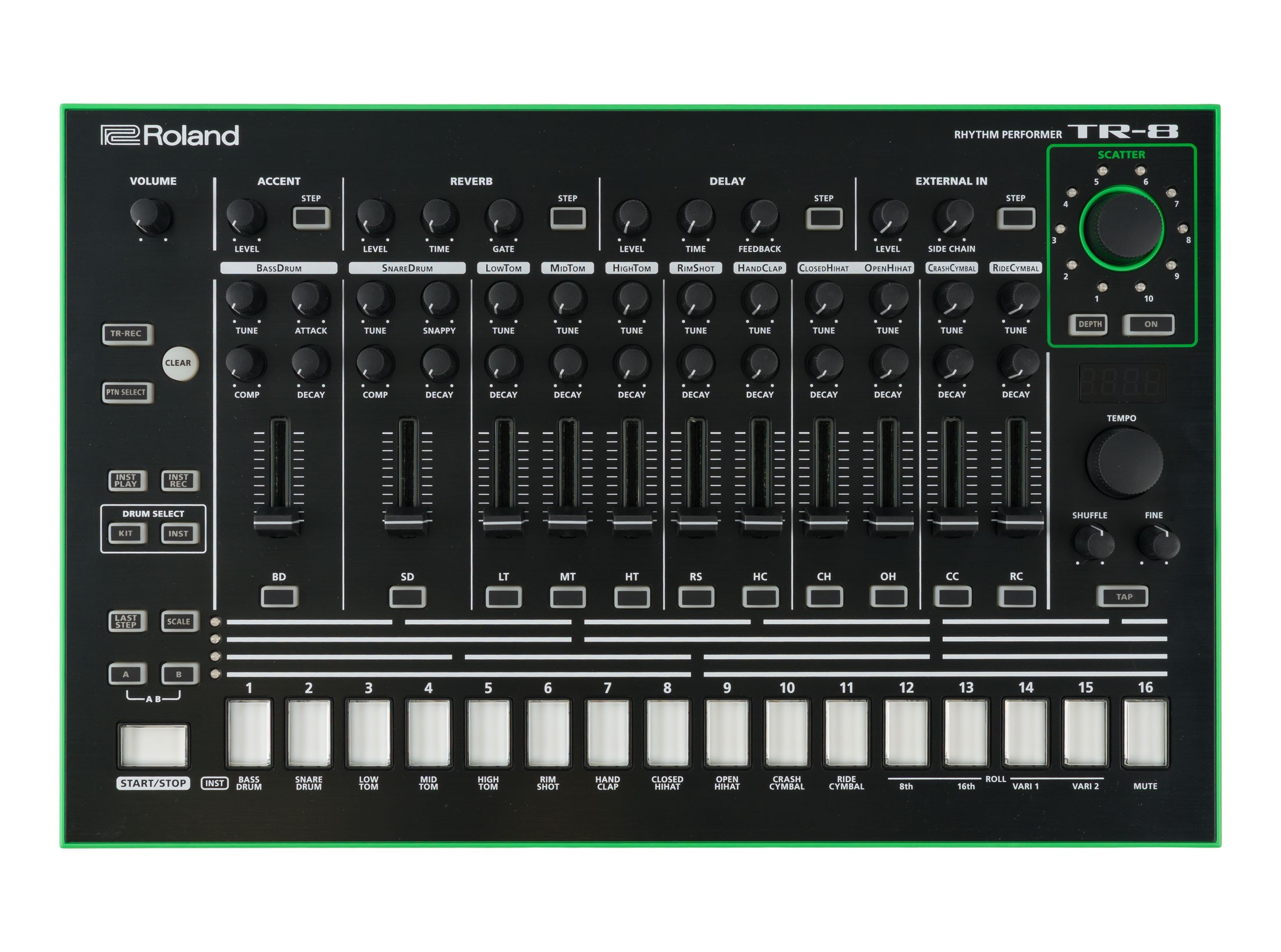
Roland TR-8 Rhythm Performer hardware on a pure white studio background running TRGR8 1.0.0 firmware
Roland TR-8 · Stock Hardware (Zero Soldering) TRGR8 1.0.0 · Dual A/B Recovery
“I wanted to honor Roland with this release and follow their spirit so every feature I added had to fit the simplicity and elegance of the machine or I just wouldn’t add it. This is truly a GOAT drum machine and I just wanted to make it more relevant for today’s musicians.”
— Shanon Fernald, Creator of TRGR8

TRGR8 turns any stock Roland TR-8 into a full hardware sampler, multitrack USB audio interface, and parameter-locked performance drum machine with zero soldering. Record straight from EXT IN into a 1.5 MB onboard sample pool, sculpt every recorded sound, factory waveform, or synth drum with the eleven front-panel faders, and lock channel knobs and faders per step in TR-REC.

Connect one USB cable to stream 14 class-compliant audio inputs at 48 kHz directly into your DAW—no proprietary Roland driver required—or open the included TRGR8 Librarian on Apple Silicon Mac or Windows x64 to drag-and-drop kits, program patterns offline, import your own Roland v1.61 factory library, and update firmware safely over USB.

USB Audio Interface 14 Inputs · Class Compliant 24-bit, 48 kHz UAC2 · MIX L/R, 11 drum stems & mono EXT IN
Onboard Sample Pool 1.5 MB · Up to 131 s 24 kHz mono 4-bit IMA ADPCM · 11-fader editor & 12 choke groups
Effects & Sequencer 50 Variations · P-Locks 10 Accent, 10 Reverb, 10 Delay, 10 Sidechain & 10 Scatter + soft takeover
Desktop & Safety Mac & Windows Librarian Dual A/B boot slots · Preserves stock Roland updater & rollback

Architecture & Capabilities

Get to know TRGR8. Everything built around the TR-8 panel.

Every workflow lives naturally on the existing knobs, faders, step pads, and 4-digit display—backed by brick-proof Dual A/B recovery and a desktop Librarian.

USB Audio Class 2.0 · Zero Vendor Drivers

14 Input Class-Compliant USB Interface.

Plug into Mac, iPad, Linux, or Windows over a single USB cable at 24-bit, 48 kHz. Record the stereo mix, all eleven individual drums in front-panel order, and mono EXT IN simultaneously while monitoring your DAW master on outputs 1–2 alongside USB MIDI and Librarian sync.

14 In MIX 1–2, BD–RC 3–13 & EXT IN 14
24/48 24-bit, 48 kHz class-compliant audio
0 Drops Verified 2-min 300 BPM 32nd-note Mac soak
SP-1200–Style Sample Editing · 11 Faders

Sample from EXT IN and sculpt with all 11 faders.

In DRUM SELECT INST, tap an empty tone pad to arm (Stby), tap again to record (rEC), and tap a third time to edit. Use faders for coarse sweeps and TEMPO for single-frame Start, End, and Loop markers—tap any fader below to inspect its range:

Green dot = also active on synthesized drum voices (6 faders light up)

BD Fader · Playback Type (Shot, triG, Loop)

Choose how a tone behaves on repeat hits: Shot ignores retrigger until finished, triG (default) restarts on every hit, and Loop repeats continuously between Loop Point and End.

Modes: Shot / triG / Loop Applies to: Samples & Factory PCM Tap BD button to confirm name
Hold Any STEP Button + Turn SCATTER · 50 Total Variations

Ten variations across every effect section—plus ten rebuilt Scatters.

Hold ACCENT STEP, REVERB STEP, DELAY STEP, or EXT IN STEP and turn the SCATTER dial to audition ten tailored algorithms per section—all tempo-syncable and storable per kit or globally. Explore all 50 variations interactively below:

CLAS
ACCENT STEP + SCATTER Kit Accent · Ring 1

Dial 1 · Classic

Raises hit velocity with the original TR-8 accent response.

Sequencing & Live Mix

Parameter locks, 49-control pickup & persistent mutes/solos.

In TR-REC, hold any step and move an instrument’s knobs or fader to lock tune, attack, compression, decay, and level per hit across both A and B variations. Turn any knob afterward to see its live 0–127 target—the physical control picks up smoothly without jumps. In INST PLAY, pad 16 cycles blinking red mutes and blinking blue solos that survive pattern, kit, mode, and power cycles.

Hold Step + CLEAR (keep hit) 49-Control Soft Takeover Mute & Solo Persistence
Mac (Apple Silicon) & Windows x64

Build kits, program patterns & back up over one USB cable.

Drag WAVs onto any of the eleven strips, import whole folders with smart drum auto-assignment, edit 11-lane A/B patterns offline, export portable .trgr8 kits/patterns or 24 kHz WAVs, and drop in your own original Roland v1.61 update ZIP locally to extract 32 PCM waveforms, 16 factory kits, 16 patterns, plus playable TR-707 and TR-727 kits.

Apple Notarized Mac App Offline Queue & Conflict Sync 1-Click USB OS Updates

USB Routing, Memory & Comparisons

14-input multitrack USB, onboard sample pool & stock TR-8 comparison.

Inspect how all 14 USB recording inputs map straight into your DAW, how the 1.5 MB sample pool allocates takes, and how TRGR8 expands stock Roland TR-8 v1.61 hardware.

14-Input Class-Compliant USB Audio Map

24-bit, 48 kHz high-speed USB · Audio, USB MIDI & Librarian share one cable

Inputs 1–2 · MIX L/R(Stereo Master) Includes Reverb, Delay & Scatter
Inputs 3–7 · BD, SD, LT, MT, HT(5 Mono Stems) Post-fader, kit gain & voice edit
Inputs 8–13 · RS, HC, CH, OH, CC, RC(6 Mono Stems) Active even if routed to A or B
Input 14 · EXT IN(Mono Sum) Post-LEVEL & post-Sidechain
Outputs 1–2 · DAW Return(Stereo Monitor) Feeds MIX & PHONES (excluded from rec)
Stereo master & DAW return 11 isolated drum stems Processed external input

Connect the TR-8 directly to a high-speed USB port for all 14 recording inputs. Full-speed USB connections automatically fall back to stereo recording and playback.

Onboard Sample Pool & Hardware Benchmarks

1.5 MB NOR Flash pool (24 kHz mono 4-bit IMA ADPCM) · Verified 48 kHz engine

Max Sample Capacity 1.5 MB · up to ~131 seconds
Sector Allocation Unit 4 KB per sector · shared across 16 kits
14-Channel USB Mac Soak 300 BPM · 11 drums on every 32nd · 0 drops
Dual A/B Recovery Architecture 2 OS slots + CRC-32 boot journal
Per-Sound Choke Groups 12 groups (OFF or 1–12) · synths, PCM & samples
Flash storage & boot safety Real-time voice & sector layout Verified 14-input USB endurance

In a two-minute physical Mac test, Core Audio recorded over 5.76 million 14-channel frames at 300 BPM with all eleven sampled drums firing every 32nd note and zero capture drops or skipped codec frames.

4-Digit Panel Readout Reference

Actual 4-character 7-segment display codes shown on the Roland TR-8 under TRGR8 1.0.0.

TrG8
Startup Greeting 4 CHARS

Shown for three seconds at normal power-on before switching to tempo. Hold PTN SELECT here to open system settings.

How TRGR8 Compares to Stock Roland TR-8

Stock Roland TR-8 hardware running TRGR8 1.0.0 alongside stock Roland OS v1.61

Capability TRGR8 1.0.0 (Roland TR-8) Stock Roland TR-8 (v1.61)
Onboard Sampling Yes — 1.5 MB pool (~131 s, 24 kHz IMA ADPCM) from EXT IN, shared across 16 kits None (fixed internal synth & ROM only)
Sound Editing 11-fader SP-1200–style editor (+36 dB gain, ±12 st pitch, 1-frame Start/End/Loop, Attack, Decay, Reverse, Filter) Tune, Attack/Snappy, Comp, Decay knobs only
Choke Groups 12 cross-voice choke groups across synths, factory PCM & user samples CH/OH hardware choke pair only
Parameter Locks Hold any TR-REC step + move controls to lock multiple knobs & fader per hit; 49-control pickup Accent/FX step gates only; no per-step drum control locks
Mutes & Solos Independent Mute & Solo editor (pad 16) that persists across modes, patterns, kits & power cycles Temporary mutes only in INST PLAY
Effects & Scatter 10 Accents, 10 Reverbs, 10 Delays, 10 Sidechains & 10 rebuilt Scatters (tempo-syncable, per-kit or shared) 1 Accent, 1 Reverb, 1 Delay, 1 Sidechain & 10 Scatter presets
USB Audio Driver Class-compliant UAC2: 14 inputs + 2 outputs at 24-bit, 48 kHz (zero vendor driver on Mac/iPad/Linux/Win) Proprietary Roland vendor driver required for multitrack USB
Desktop Librarian Mac (Apple Silicon) & Windows x64 app for drag-drop kits, offline patterns, WAV export, v1.61 import & 1-click USB updates None (manual pad-2 binary backup only)

TRGR8 never overwrites Roland’s factory bootloader or TR-8:Updater recovery partition—so standard TR8_UPD.BIN rollback remains intact.

Memory Layout, Recovery Safety & File Formats

Verified hardware architecture and host tools included in TRGR8 1.0.0

Subsystem Technical Detail
Sample Pool Allocation 1.5 MB NOR Flash pool holding up to ~131 seconds of 24 kHz mono, 4-bit IMA ADPCM audio in 4 KB sectors. Each instrument shares its recorded tones across all 16 kits while each kit stores its own tone selection.
Autosave & Flash Integrity After one second with transport stopped and controls released, TRGR8 snapshots pattern, kit, tone, and mute/solo edits one flash page at a time, verifies contents, and commits cleanly.
Dual A/B Recovery Stage-1.5 boot supervisor manages dual Main OS slots (A & B) with a CRC-32 boot control journal, automatic HardFault/Watchdog rollback, and standalone USB recovery—leaving Roland’s factory boot blocks untouched.
Librarian Portable Files Export individual instruments, kits with referenced samples, or complete patterns (A/B variations, weak hits, accent, flam, FX lanes, and all parameter locks) as .trgr8 files or 24 kHz mono WAVs.
v1.61 Factory Importer Drop your own original Roland TR-8 v1.61 update ZIP or TR8_UPD.BIN locally into the Librarian to extract 32 PCM waveforms, 16 kits, 16 patterns, and playable TR-707 / TR-727 kits.
USB Audio Fallback High-speed USB exposes 14 recording channels + 2 playback channels at 24-bit, 48 kHz; full-speed USB connections automatically expose 2 recording + 2 playback channels.

Verified Feature Inventory

All 36 features in TRGR8 1.0.0

Every capability below is verified directly in TRGR8 1.0.0 and the desktop Librarian. Filter by subsystem to inspect exact hardware workflows and controls.

Showing 36 of 36 verified features

Sampling & Editor

Three-Tap EXT IN Recording

In DRUM SELECT INST, tap the first empty tone pad to arm (Stby, solid gold), tap again to record (rEC, flashing gold), and tap a third time to finish straight into Edit. Silent takes show noIn and keep the pad free.

Sampling & Editor

Capture Dry or Sidechained EXT IN

Sampling sums the stereo rear EXT IN jacks to mono after EXT IN LEVEL and Sidechain—letting you record dry instruments or print rhythmic pumps and gates straight into a pad.

Sampling & Editor

1.5 MB Shared Sample Pool (~131 s)

Stores up to ~131 seconds of 24 kHz mono 4-bit IMA ADPCM audio across 4 KB sectors. Each instrument shares its recorded tones across all 16 kits while each kit remembers its own selections.

Sampling & Editor

SP-1200–Style 11-Fader Editor

Sculpt recordings and factory PCM from left to right: Type (Shot, triG, Loop), Gain (up to +36 dB / 6400%), Pitch (±12 st), Start, End, Loop Point, Attack, Decay, Reverse, Choke Group, and Low-Pass Filter.

Sampling & Editor

Single-Frame Precision & Live Trim

Tap the gold pad to audition at full strip level, move a fader for coarse sweeps, and turn TEMPO for single source-frame Start, End, and Loop adjustments while playback stays click-free and continuous.

Sampling & Editor

12 Cross-Voice Choke Groups & Synth Edits

Assign any synth drum, factory waveform, or sample to Choke Groups 1–12 (or OFF) so hitting one sound cuts off another’s tail. Synthesized voices also light up all six supported faders (Gain, Pitch, Attack, Decay, Choke, Filter).

Sequencing & Locks

Multi-Parameter Per-Step Locks

In TR-REC, hold any step and move the selected instrument’s knobs or fader to lock Tune, Attack, Comp, Decay, and Level together. Each instrument and A/B variation keeps independent locks while unlocked controls follow live settings.

Sequencing & Locks

Non-Destructive Lock Clear vs Hit Erase

Hold a step first and press CLEAR to strip only that instrument’s parameter locks while keeping the note—or hold CLEAR first and tap the step to erase both hit and locks.

Sequencing & Locks

49-Control Soft Takeover (Pickup)

After a step edit or incoming MIDI change, turning a physical knob or fader displays the stored live target and waits until you reach or cross that value—preventing sudden parameter jumps mid-set.

Sequencing & Locks

0–127 Live Parameter Readouts

Moving any channel knob or level fader temporarily shows its exact MIDI-scaled value from 0–127 on the 4-digit display for two seconds before returning to tempo.

Sequencing & Locks

Persistent Mutes & Independent Solos

In INST PLAY, tap pad 16 to cycle mute edit (blinking red), solo edit (blinking blue), and normal play (steady red). Mutes and solos persist across patterns, kits, modes, and power cycles; hold pad 16 + CLEAR to restore all voices.

Sequencing & Locks

Complete Stock TR-8 Sequencing Workflows

Retains TR-REC, INST REC, weak hits, flam, A/B variations, queued patterns, contiguous pattern ranges, track copy, pattern lock (PTN SELECT + TEMPO), rolls, step loops, and tap tempo.

Effects & Scatter

10 Per-Kit Accent Articulations

Hold ACCENT STEP and turn Scatter to choose Classic, Snap, Drop, Scoop, Stair (4-note contour), Chop, Bark, Steel, Hand, or Double—and hold ACCENT STEP + pad in INST PLAY to audition.

Effects & Scatter

10 Stereo Reverb Spaces

Choose Room, Tile, Plate, Spring, Chamber, Gated, Reverse Bloom, Slapback Room, Cathedral, or Abyss—with GATE tailored per algorithm (such as spring drip, early slaps, or stereo width).

Effects & Scatter

10 Delay Variations with 8 Clock Divisions

Dial in Clean Echo, Ping-Pong, Tape, Bucket Brigade, Three-Head, Reverse, Sync, Ducking, Flam, or Ratchet. Pong, Sync, and Ratchet offer eight selectable clock divisions below the TIME end stop.

Effects & Scatter

Tempo-Syncable Reverb & Delay

Turn REVERB TIME or DELAY TIME fully clockwise to lock decay or repeats to internal tempo, tap tempo, or incoming MIDI clock—displaying Sync for two seconds.

Effects & Scatter

10 External Input Sidechain Shapes

Program Classic Duck, Pump, Hold, Double Dip, Triplet, Chop, Low Duck (180 Hz crossover), Filter sweep, Alternating Pan, or sustained Gate directly on the EXT IN STEP lane, even on empty drum steps.

Effects & Scatter

10 Rebuilt Scatter Effects & Lane Clear

Perform Beat Repeat, Reverse, Ratchet, Live Gate, Pair Exchange, Bidirectional Scratch, Four-Step Rewind, Triplet Roll, Reverse Ratchet, and Break Fill across 10 depths—plus hold any effect STEP + CLEAR to wipe that lane.

14-Ch USB Audio

14-Input Class-Compliant UAC2 Audio

Streams 14 recording inputs and 2 playback outputs at 24-bit, 48 kHz over standard USB Audio Class 2.0—plug straight into Mac, iPad, Linux, or Windows with zero proprietary driver install.

14-Ch USB Audio

Stereo MIX + 11 Isolated Drum Stems

Inputs 1–2 capture stereo MIX with Reverb, Delay, and Scatter; inputs 3–13 capture individual mono stems from BD through RC post-fader and post-voice edit, ahead of shared FX and master volume.

14-Ch USB Audio

Processed EXT IN on Channel 14

Input 14 records mono EXT IN after its input level knob and active sidechain envelope—perfect for tracking pumped or gated external synths separately from the drums.

14-Ch USB Audio

Independent A/B Jack & Stem Routing

All eleven USB drum stems remain active in your DAW even when instruments are routed exclusively to analog assignable outputs A or B for external hardware processing.

14-Ch USB Audio

Feedback-Free DAW Stereo Return

Route your DAW master to outputs 1–2 to monitor computer tracks through MIX and PHONES under front-panel VOLUME control—cleanly excluded from all 14 USB recording channels.

14-Ch USB Audio

Single-Cable Audio, MIDI & Librarian

14-channel audio, USB MIDI clock/notes/CCs, and Librarian bulk transfers run concurrently over one USB cable—verified over a 2-minute 300 BPM 32nd-note soak on macOS with zero drops.

Desktop Librarian

Signed & Notarized Mac + Windows Apps

Native desktop Librarian included for Apple Silicon Mac (Developer ID signed and Apple notarized) and portable Windows x64 (WebView2 Runtime), working offline or live over USB.

Desktop Librarian

Drag-and-Drop Kits & Folder Auto-Assign

Drop WAV files onto any of the eleven strips or import an entire folder with automatic kick/snare/hat strip suggestions, then audition and tweak all 11 sample parameters, pan, gain, and FX sends.

Desktop Librarian

11-Lane Offline A/B Pattern Sequencer

Program full 16-step A/B patterns across all eleven lanes on your computer, review accents and steps visually, and send patterns straight to any TR-8 slot.

Desktop Librarian

Full Backup, .trgr8 Export & WAV Decode

Read all 16 kits, 16 patterns, and hardware recordings. Save portable .trgr8 files preserving weak hits, flam, FX steps, parameter locks, fine markers, and synth edits—or export takes as 24 kHz mono WAVs.

Desktop Librarian

Offline Queue, Sample Reuse & Conflict Guard

Stage kit edits offline and sync automatically when the TR-8 connects and stops. Reuses matching samples to save 1.5 MB pool space and preserves both copies if hardware and computer edits conflict.

Desktop Librarian

Local Roland v1.61 Factory Importer

Drop your own original Roland TR-8 v1.61 update locally into the Librarian to extract 32 PCM waveforms, 16 factory kits, 16 patterns, and two playable TR-707 and TR-727 kits.

System & Safety

Brick-Proof Dual A/B Recovery Supervisor

Stage-1.5 boot supervisor manages dual Main OS slots with a power-cut-safe CRC-32 boot journal and automatic HardFault/Watchdog rollback—never touching Roland’s factory boot or updater blocks.

System & Safety

Guided First Install & 1-Click USB Updates

The Librarian walks you through stock Roland backup, optional v1.61 factory sound injection, and drive installation on first setup—and handles later TRGR8 updates with automatic Session.zip backup over USB.

System & Safety

Autosave with Verified Page Commits

One second after transport stops and controls are released, TRGR8 snapshots pattern, kit, and tone edits one flash page at a time with readback verification. Routine updates preserve user samples.

System & Safety

Complete Power-On System Menu

Hold PTN SELECT at startup to set MIDI channel, clock auto/internal, DIN MIDI Thru, momentary/latch Scatter, assignable A/B outputs, per-kit vs shared effects, screen-saver delay, and pad color schemes.

System & Safety

5-Pin DIN MIDI Thru, Clock & CCs

Supports hardware DIN MIDI Thru (including clock, running status, and SysEx), USB clock priority, incoming note aliases, kit Program Change, and panel CC control.

System & Safety

Clean Rollback to Stock Roland OS

Zero hardware modification required: enter the untouched stock TR-8:Updater drive anytime (pad 1 at power-on) to restore Roland’s official TR8_UPD.BIN.

One-Time Purchase · No Subscriptions

Buy TRGR8 1.0.0

$45 USD

Lifetime Free Updates

Roland TR-8 Rhythm Performer running TRGR8 1.0.0

What’s in the TRGR8 1.0.0 Release Bundle

  • TRGR8-Librarian-1.0.0-macOS-arm64.zip — Signed & notarized Apple Silicon Mac Librarian (3.2 MB)
  • TRGR8-Librarian-1.0.0-Windows-x64.zip — Portable Windows x64 Librarian + runtime DLLs (3.0 MB)
  • TRGR8-OS-1.0.0-First-Install.zip — Manual drive TR8_UPD.BIN for stock Roland TR-8 (302 KB)
  • TRGR8-OS-1.0.0-Update.zip — Recording-preserving drive TR8_UPD.BIN for existing TRGR8 (302 KB)
  • TRGR8-User-Guide-1.0.0.pdf — 36-page Gear Up! visual user guide (662 KB)
  • TRGR8-Technical-Manual-1.0.0.pdf — 29-page complete technical & recovery manual (856 KB)
  • TRGR8-Cheat-Sheet-1.0.0.pdf — 2-page printable quick-reference cheat sheet (73 KB)
  • SHA256SUMS — SHA-256 verification checksums for every file (1 KB)

TRGR8 is independent replacement firmware and desktop software engineered from scratch to unlock sampling, 11-fader sound editing, parameter locks, 50 effect variations, and 14-input class-compliant USB audio on stock Roland TR-8 hardware. No subscriptions, no hardware mods—just a single $45 USD one-time purchase with Lifetime Free Updates.

Once your Stripe payment is received, the full TRGR8 1.0.0 release bundle (Mac & Windows Librarian apps, First Install & Update firmware installers, manuals, and SHA256SUMS) is emailed to your Stripe checkout address. Supply your own Roland v1.61 update inside the Librarian to import all 32 factory waveforms, 16 kits, and 16 patterns locally.

Full Release Bundle · Mac, Win & OS

TRGR8 1.0.0

$45 USD
Release
TRGR8 1.0.0 (Build B58)
Price
$45 USD (one-time purchase · Lifetime Free Updates)
Checkout
Stripe Checkout
Delivery
Full TRGR8 1.0.0 release bundle (Mac & Windows Librarian, firmware installers, and manuals) emailed to your Stripe checkout address when payment is received.
Rollback
Reverts to official Roland TR8_UPD.BIN via stock updater anytime
Buy TRGR8 — $45 via Stripe

Lifetime Free Updates

Full TRGR8 1.0.0 release bundle is emailed to your Stripe checkout address when payment is received. Questions? Contact support@gearup.app.

Installation & Rollback

Guided USB installation. Zero soldering required.

Install effortlessly using TRGR8 Librarian (Mac or Windows) or manually via the stock TR-8 USB update drive—while keeping Roland’s factory updater and rollback intact.

  1. 01

    Back up Roland kits & optionally stage v1.61 factory sounds

    Open TRGR8 Librarian and select Install or update OS → Roland OS · First install (if updating from an earlier TRGR8 build, choose the existing-installation USB update instead so your music backs up to Session.zip). Hold PAD 2 at power-on to back up stock Roland files, and optionally drop in your own official Roland TR-8 v1.61 update to include the 32 factory waveforms in the dedicated donor bank.

  2. 02

    Enter Pad-1 Update Drive & copy TR8_UPD.BIN

    Hold PAD 1 while switching on the TR-8 and connect USB. The Librarian detects the verified TR-8 update drive, writes and verifies TR8_UPD.BIN, and safely ejects it. For manual installation without the app, extract TRGR8-OS-1.0.0-First-Install.zip (for stock Roland OS) or TRGR8-OS-1.0.0-Update.zip (for existing TRGR8) and copy TR8_UPD.BIN directly to the update drive.

  3. 03

    Confirm on the panel & verify TrG8 startup

    Unplug USB, press PAD 2 when it flashes, and leave power untouched until all eleven instrument buttons and all sixteen pads blink together. Power-cycle normally: the 4-digit LED displays TrG8 for three seconds before showing tempo, and the Librarian confirms TRGR8 1.0.0 upon reconnection.

  4. 04

    Configure DAW 48 kHz audio & power-on preferences

    Connect the TR-8 directly to a high-speed USB port, select TRGR8-OS at 48 kHz in your DAW (14 inputs, 2 outputs), and hold PTN SELECT during the TrG8 startup greeting anytime to configure assignable A/B outputs, DIN Thru, Scatter behavior, or shared vs per-kit effects.

Compatibility & Honest Limits

Before you install. Clear hardware notes.

Real hardware behavior, sample pool limits, and factory asset notes documented directly from the TRGR8 1.0.0 release specification.

First Install Initializes Sample Storage

First Install is strictly for stock Roland TR-8 firmware and initializes the 1.5 MB user recording area. If your instrument already runs an earlier TRGR8 build, always use the Librarian’s existing-installation update or TRGR8-OS-1.0.0-Update.zip so your recordings stay intact.

Sample Pool & 4 KB Sector Allocation

The 1.5 MB pool holds up to ~131 seconds of 24 kHz mono 4-bit IMA ADPCM, allocated in whole 4 KB sectors. Many very short takes consume at least one 4 KB sector each, slightly reducing total remaining seconds; recording stops and saves automatically when the pool fills.

Supply Your Own Roland v1.61 Update

To respect Roland’s copyright, TRGR8 ships zero factory PCM samples inside the download. Drop your own original Roland TR-8 v1.61 system update locally into the Librarian during First Install (or later in the library) to extract all 32 factory waveforms, 16 kits, and 16 patterns. Standalone 7X7 expansion import remains a future feature.

USB Audio Bandwidth & Platform Notes

Connect the TR-8 directly to a high-speed USB port at 48 kHz for all 14 recording inputs (full-speed ports fall back to stereo). Fourteen-channel operation is physically verified on macOS Apple Silicon with Apple’s built-in driver; on Windows x64, extract the entire Librarian folder so its adjacent DLLs remain beside TRGR8 Librarian.exe (Windows edition is unsigned).

Autosave Timing & Power Safety

Stop playback and release panel controls for one second before switching off power so the page-verified autosave snapshot commits pattern, kit, tone, and mute/solo changes cleanly. Never unplug power while all instrument buttons and step pads are blinking during a firmware flash.

Independent Third-Party Software & Roland Credit

TRGR8 (trgr8.gearup.app) is an independent third-party firmware and software project by Gear Up! and is not affiliated with, endorsed by, or supported by Roland Corporation. Roland, AIRA, TR-8, and related marks belong exclusively to Roland Corporation. Support: support@gearup.app.

TRGR8 1.0.0 for Roland TR-8

$45 USD one-time purchase via Stripe · Full TRGR8 1.0.0 release bundle emailed when payment is received · Reverts to Roland OS anytime.

Buy TRGR8 — $45 Lifetime Free Updates